

A CRM can hold thousands of contacts and still leave sales teams without the information they need. Missing work emails, outdated job titles, unreliable phone numbers, and poorly represented regions can make an otherwise large database difficult to use.
The natural response is to buy more enrichment credits. Yet another provider may return the same gaps, repeat existing information, or add fields nobody uses.
According to Gartner’s research from 2020, poor data quality costs organizations an average of $12.9 million annually. While this is an older research estimate rather than a current benchmark, it illustrates why data quality deserves attention.
A January 2026 IBM analysis also highlights how inaccurate, incomplete, and inconsistent information can affect operational decisions and increase rework.
The challenge is not simply to buy more data. It is to improve usable CRM coverage while controlling enrichment costs, verification effort, and uncertainty.
What Is a B2B Data Enrichment Waterfall?
A data enrichment waterfall is an ordered sequence of providers or validation checks used to complete missing CRM fields. A record goes to the first source. If the result meets the required acceptance standard, the lookup stops. If the field remains incomplete or the result fails validation, the process moves to the next source.
The important distinction is that providers are called only for unresolved fields.
If a contact already has a verified work email but no direct phone number, there is no reason for another email lookup. The next source should address the missing phone number.
This is what makes a waterfall different from simply connecting multiple databases or sending every record to every provider.
It creates a controlled provider sequence, with a defined purpose for each lookup and a stopping condition for every field.
A wider B2B data enrichment strategy helps determine which additional information is necessary for qualification, segmentation, and lead routing. A waterfall focuses specifically on how that information should be obtained efficiently.
Why One Data Provider Rarely Delivers Complete CRM Coverage
Every provider builds its database using a different mix of sources, collection methods, and update cycles. As a result, coverage varies across several dimensions.
- Geography and company size: A provider may have strong coverage of large North American companies but weaker information for smaller businesses or organizations in other regions. Another may perform better in European markets or specific industries.
- Contact role: Some databases are stronger at identifying senior executives, while others have better coverage of technical, operational, or specialist roles. The difference matters when a campaign targets a specific buying group.
- Field type: Work emails, mobile numbers, company details, and technology information require different data sources. A provider with reliable email coverage may have limited phone data.
- Freshness: People change jobs, companies restructure, and contact details become outdated. A previously accurate record can lose value when the underlying information changes.
- Source methodology: Providers may return observed, verified, or inferred information. Their definitions of a successful match can also differ, making headline coverage figures difficult to compare.
This is why CRM coverage can remain uneven even when an organization subscribes to a well-known data provider.
No single provider should be considered universally best. The right source depends on the field, target segment, geographic coverage, and acceptance requirements.
Sequential vs Parallel Data Enrichment Models
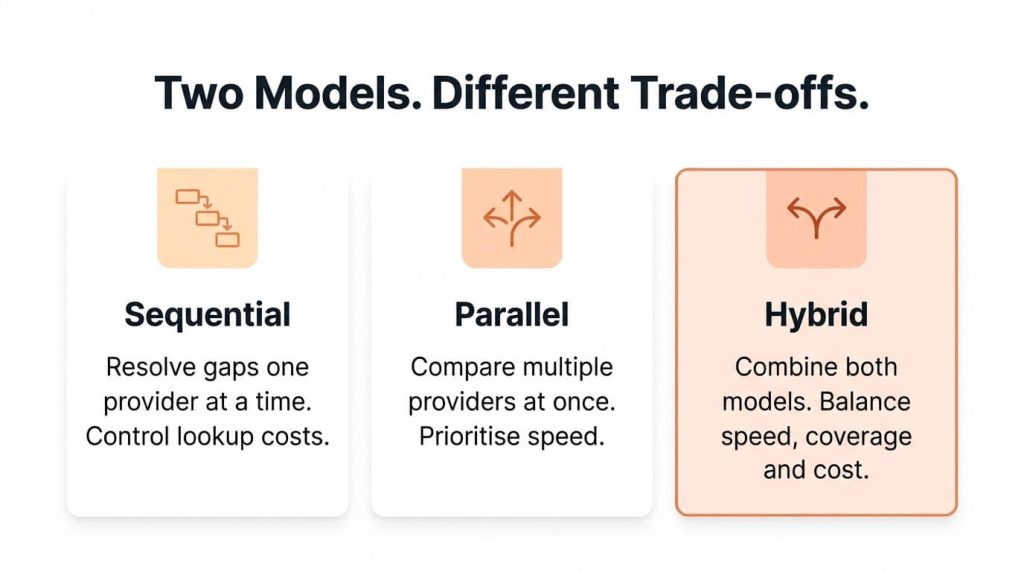
There are three common ways to organize multiple enrichment sources.
Sequential enrichment sends a record to one provider at a time. The next provider runs only when the previous result is missing or fails validation. This limits unnecessary lookups and makes spending easier to control.
Parallel enrichment sends the same record to several providers simultaneously. It can reduce turnaround time and allow results to be compared, but may also create overlapping charges and conflicting values.
Hybrid enrichment combines both approaches. Routine records follow a sequential process, while selected fields or high-value accounts receive additional checks in parallel.
Comparing enrichment models
| Factor | Sequential | Parallel | Hybrid |
|---|---|---|---|
| Processing speed | Depends on sequential response times | Can be faster when sources respond concurrently | Depends on configured paths |
| Cost control | Usually easier to limit unnecessary calls | Multiple chargeable lookups may occur | Can prioritize cost by record or field |
| Conflicting results | Fewer simultaneous conflicts | Requires explicit reconciliation rules | Conflicts handled for selected fields |
| Suitable use case | Batch enrichment and routine CRM updates | Time-sensitive verification or comparison | Mixed-volume, mixed-priority workflows |
| Main trade-off | Additional latency from fallbacks | Higher potential lookup cost | Greater orchestration complexity |
The right model depends on the workflow. A large contact list being prepared for a campaign can usually tolerate sequential lookups. A real-time lead-routing process may need a shorter sequence to avoid delaying the response.
The important consideration is whether the additional source improves the outcome enough to justify its cost and processing time.
Step 1: Define Required Fields and Acceptable Evidence
Before selecting providers, establish which CRM data fields the business actually needs.
A campaign may require a verified work email, current job title, company website, and location. An account-based program may also need company size, industry, parent-company relationships, and buying-group roles.
The requirements should reflect how the information will be used.
CRM field requirements and acceptance criteria
| CRM Field | Business Purpose | Acceptable Evidence |
|---|---|---|
| Work email | Outreach and contactability | Email verification meeting organizational rules |
| Job title and function | Persona segmentation and personalization | Current professional role supported by a reliable source |
| Company domain | Account matching and deduplication | Verified business website or company identifier |
| Employee range | Company-size segmentation | Recent firmographic data with recorded source |
| Country or region | Territory routing | Validated location appropriate to routing rules |
| Parent-company relationship | Account hierarchy and ABM | Verified organizational relationship |
| Technology information | Technographic targeting | Relevant, sufficiently recent technology-usage evidence |
A field that supports lead routing may need stronger evidence than one used for broad account segmentation.
For example, an inferred email pattern should not automatically qualify as a verified outreach address. Similarly, a general company-headquarters location may be unsuitable when the routing decision depends on where the individual contact works.
This prevents enrichment from becoming a process of filling every blank.
The business gets the information it can use, with a clear standard for deciding whether a returned value is acceptable.
Step 2: Order Providers by Field, Segment and Cost
The first provider in a sequence receives the largest share of eligible lookups. Its position therefore affects both coverage and total spend.
Provider selection should consider:
- Field strength: How reliably does the source return the specific information required?
- Geography: Does it cover the markets being targeted?
- Segment: Is it effective for the relevant industries, company sizes, and job functions?
- Freshness: How recently is its information verified or updated?
- Match rate: How often does it return an accepted result on your actual database?
- Cost: What does it cost to obtain a usable value?
A provider with a lower lookup price may still be more expensive if it returns fewer accepted results. Equally, a premium source may be better placed later in the sequence if it specializes in difficult records.
Example: Different provider sequences for different fields
The following example uses hypothetical provider categories, not actual vendor performance rankings.
| Required Field | First Source | Fallback Source | Acceptance Condition |
|---|---|---|---|
| Work email | Professional contact database | Independent email discovery or verification | Passes defined verification requirements |
| Direct phone | Verified contact-data provider | Region-specific phone-data source | Matches contact and quality rules |
| Company size | Firmographic database | Official information or secondary source | Accepted range with traceable source |
| Parent-company relationship | Corporate hierarchy database | Authoritative registration records | Correct entity relationship |
| Technology usage | Technographic source | Additional validated technology evidence | Meets freshness and relevance rules |
Provider order may also differ by region or segment.
For example, a source that performs well for North American enterprise accounts might be the first choice for one campaign, while a regional provider could be more effective for smaller businesses in another market.
The correct order should come from test results on the organization’s own records, not vendor marketing claims alone.
Each additional provider should demonstrate meaningful incremental coverage beyond the sources already used.
Step 3: Set Match and Confidence Rules
A returned value should not automatically qualify for CRM write-back. The process needs clear match rules and confidence levels.
- Exact match: Information aligns with a verified identifier or a strong combination of fields. It may qualify for automatic write-back if it also meets the field’s acceptance standard.
- Probable match: Available evidence supports a likely result, but some details remain unconfirmed. The record may need another check or a review flag.
- Ambiguous match: Several candidates are plausible, or the returned information conflicts with existing records. The system should hold the result for review rather than selecting one by default.
Set minimum confidence thresholds for different fields and business uses.
An email intended for outbound communication may require independent verification. A company-size estimate used for broad segmentation may be accepted under a different standard.
Confidence should reflect both positive and conflicting evidence. A matching company name is helpful, but a contradictory domain or location may lower confidence.
For every accepted value, retain useful provenance information such as provider, source identifier, verification method, timestamp, and confidence status.
Do not treat provider-generated confidence scores as interchangeable unless they have been calibrated against the same acceptance criteria.
Step 4: Add Stopping Rules and Cost Controls
A waterfall needs clear conditions for when to stop searching. Otherwise, the process can continue consuming credits after additional information has little practical value.
Stop a lookup when:
- The required field has an accepted value.
- The result meets the minimum confidence threshold.
- The permitted credit or lookup limit has been reached.
- The workflow exceeds its allowed response time.
- The approved budget threshold is reached.
- The available provider sequence has been exhausted.
Example: Stopping rules for one CRM record
Assume a campaign has a hypothetical six-credit maximum per record, a limit of three approved providers for each unresolved field, and a 15-second response-time limit for a time-sensitive workflow.
The following operating logic applies:
- Check which required fields are already verified. Do not spend credits on accepted fields unless revalidation is required.
- Query the first approved provider for unresolved fields.
- Validate the returned values and record the credits charged.
- Stop looking up any field once it meets the acceptance standard.
- Continue to an approved fallback only when enough credits and processing time remain.
- Do not initiate a lookup that could exceed the six-credit ceiling.
- If required fields remain unresolved after a limit is reached, mark them for review or a later enrichment cycle.
The six-credit and 15-second limits are illustrative policy choices, not industry standards. A real implementation should use the provider’s actual billing rules and workflow service-level requirements.
Per-record credit control example
| Lookup Activity | Credits Used | Total Credits | Decision |
|---|---|---|---|
| Initial email lookup | 1 | 1 | Email accepted |
| Company information lookup | 1 | 2 | Company details accepted |
| Initial phone lookup | 2 | 4 | Phone unresolved |
| Approved phone fallback | 2 | 6 | Accept validated result or flag unresolved |
| Further lookup | Not permitted | 6 | Stop at credit ceiling |
This approach makes spending predictable.
Additional enrichment might still be justified for a strategic account with an active opportunity, but that should require an explicitly approved higher spending limit.
Billing rules matter too. Some providers charge only when they return a result; others charge for unsuccessful lookups or validation requests.
The waterfall should calculate budget consumption based on actual chargeable events, not just successful fields.
How to Resolve Conflicting Enrichment Results
Multiple providers may return different values for the same field. A contact may have two job titles, a company may have several locations, or a phone number may differ across databases.
A single source ranking cannot resolve every conflict. Establish source precedence separately for each field.
For example, a directly verified work email may take priority over an inferred address. A recently confirmed job title may take priority over an older provider record. A verified company website and registered location may help distinguish between similarly named entities.
Freshness should be considered alongside source reliability.
A recent result is not automatically correct, but an older value should not remain in the CRM simply because it came from the preferred provider.
Where two credible sources disagree, retain the existing value, flag the conflict, and review the evidence before updating the record.
Store the original value, proposed value, source, verification date, and final decision.
Never silently overwrite a strong existing value with a conflicting third-party result.
Match and Deduplicate Before Updating the CRM
Enrichment can make an existing data problem worse if identity checks happen too late.
A contact may already exist under a shortened company name. A new lookup may return the same person with a different job title or company spelling.
Without identity checks, the CRM may create another record instead of updating the existing one.
Normalize names, email domains, websites, and locations before comparing records. Check for duplicate contacts and establish whether a person belongs to an existing account, a subsidiary, or a genuinely new organization.
This is where lead-to-account matching becomes important.
A shared domain does not necessarily mean two businesses are the same operating entity. Parent companies, subsidiaries, and regional offices may need separate account records with defined relationships.
Only write back after the contact and account identities have been checked.
Retain the original value, updated value, provider, and timestamp. This protects the CRM from silent overwrites and makes later corrections easier.
For broader cleanup requirements, refer to our guide on database cleansing.
A Step-by-Step CRM Enrichment Waterfall Workflow
A reliable CRM data enrichment process connects each stage to the next.
Recommended operating workflow
| Step | Activity | Suggested Owner | Expected Output |
|---|---|---|---|
| 01 | Intake: Identify records and missing fields | Marketing Ops | Eligible record list |
| 02 | Normalization: Standardize record fields | Data Ops | Standardized records |
| 03 | Identity checks: Match contacts to accounts | RevOps / CRM Admin | Matched identities or exceptions |
| 04 | Provider lookup: Query first approved source | Data Ops / Automation | Provider responses and credit usage |
| 05 | Validation: Test acceptance criteria | Data Quality Owner | Accepted and rejected fields |
| 06 | Fallback: Run permitted additional lookups | Data Ops / Automation | Accepted values or unresolved gaps |
| 07 | Exception review: Investigate conflicts | CRM Data Steward | Approved corrections or review flags |
| 08 | Write-back: Update validated fields | CRM Admin / Automation | CRM records and provenance |
| 09 | Audit: Record costs and remaining gaps | RevOps / Data Quality Owner | Audit log and performance report |
These are suggested ownership assignments. Actual responsibilities should reflect the organization’s operating model and system permissions.
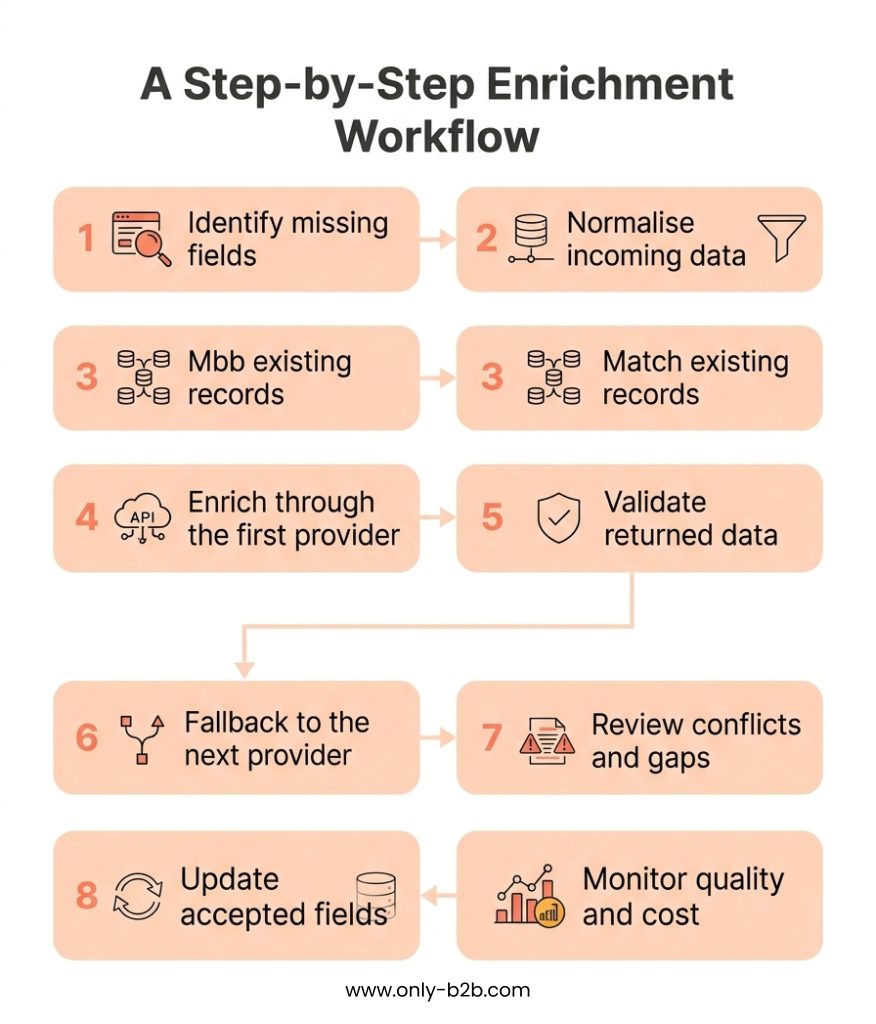
The order protects the quality of information entering the CRM.
Enriching before identity checks can create duplicates. Writing back before validation can introduce unreliable values. Running every provider regardless of the result can increase spend without improving the database.
An unresolved field should remain distinguishable from one that has not yet been checked.
That difference helps teams understand whether a gap reflects provider limitations, missing inputs, or a process issue.
How to Measure Coverage Lift and Enrichment Cost
The success of a waterfall should be measured by usable coverage and the cost of achieving it.
Track five measures:
- Coverage lift: The change in the percentage of records meeting defined usability requirements.
- Usable records: Records containing all required, accepted information for their intended purpose.
- Total credits used: Chargeable credits consumed across providers, including unsuccessful calls where applicable.
- Cost per completed field: Total relevant enrichment spend divided by accepted field completions.
- Cost per usable record: Total relevant enrichment spend divided by usable records, with the denominator clearly defined.
The most useful cost measure depends on what the team is trying to evaluate. Cost per usable record across the entire batch differs from cost per newly usable record created through enrichment.
Illustrative example: Enriching 1,000 CRM records
Assume a business begins with 1,000 CRM records.
Before enrichment, 600 records meet the minimum requirements for the planned campaign. The remaining 400 have one or more missing or unacceptable fields.
The waterfall processes only eligible gaps, using several approved providers and the previously defined acceptance rules.
For this example, assume:
- 1,000 records are evaluated.
- 600 records are initially usable.
- 850 records are usable after enrichment.
- 400 previously missing required fields are successfully completed.
- 1,400 chargeable credits are consumed.
- Each consumed credit costs $0.20.
- No additional incremental labor or software cost is included.
Enrichment results
| Metric | Before Enrichment | After Waterfall |
|---|---|---|
| Records evaluated | 1,000 | 1,000 |
| Usable records | 600 | 850 |
| Usable coverage | 60% | 85% |
| Additional usable records | — | 250 |
| Accepted field completions | — | 400 |
| Credits consumed | — | 1,400 |
| Credit cost | — | $280 |
Calculating the results
Starting usable coverage
600 ÷ 1,000 × 100 = 60%
Final usable coverage
850 ÷ 1,000 × 100 = 85%
Coverage lift
85% − 60% = 25 percentage points
This is a 41.7% relative increase over starting usable coverage, although percentage-point lift is usually clearer when reporting coverage.
Total enrichment credit cost
1,400 × $0.20 = $280
Cost per accepted field completion
$280 ÷ 400 = $0.70
Cost per newly usable record
$280 ÷ 250 = $1.12
Credit cost per usable record in the final batch
$280 ÷ 850 = approximately $0.33
The $1.12 figure is better for measuring how much the waterfall spent to make additional records usable. The $0.33 figure spreads the same enrichment credit cost across all 850 usable records, including records that were usable before enrichment.
Neither figure represents fully loaded CRM acquisition cost because the example excludes staff time, software subscriptions, and other operating expenses.
The difference between the 400 completed fields and 250 additional usable records is intentional. Some records require several accepted fields before they become usable.
How to interpret the result
The waterfall increased usable coverage from 60% to 85%.
But the result does not prove every additional lookup was worthwhile. The team should compare provider-level credit consumption, accepted results, and incremental usable records to identify where the sequence stops producing sufficient value.
This is where broader CRM data quality metrics and database health scores can help distinguish record completeness from actual campaign readiness.
Quality Controls for an Enrichment Waterfall
A waterfall needs ongoing review because provider performance and CRM information change over time.
Sample enriched records from each source. Check whether the returned values are accurate, current, and appropriate for their intended use.
Monitor rejected values, ambiguous matches, duplicate records, and manual corrections for signs that a provider’s performance has changed.
Stale fields should be retested according to their importance and expected rate of change.
Job titles and direct contact details may require more frequent checks than stable company-level information.
Example quality assurance operating plan
| QA Activity | Suggested Owner | Frequency | Corrective Action |
|---|---|---|---|
| Sample accepted enrichment results | Data Quality Analyst | Weekly | Investigate recurring field or source errors |
| Review conflicting and ambiguous matches | CRM Data Steward | Daily or per batch | Hold write-back and resolve exceptions |
| Monitor credit usage and stopping rules | Marketing Ops / RevOps | Daily during active runs | Pause abnormal spending and check configuration |
| Review duplicates and account associations | CRM Admin | Weekly | Correct identity rules and affected records |
| Retest stale contact fields | Data Operations | Based on field risk | Revalidate or mark outdated information |
| Evaluate provider performance | Data Ops / RevOps | Monthly | Reorder sources, adjust rules or review contracts |
The frequencies above are illustrative starting points, not universal standards. High-volume or high-risk environments may require more frequent monitoring.
This approach reflects the wider principle emphasized in IBM’s data quality analysis: data quality depends on ongoing governance, ownership, and prevention rather than isolated cleanup exercises.
A successful provider response is only the beginning. What matters is whether the information remains dependable when sales and marketing use it.
Build, Buy or Use a Managed Data Partner?
The operating model depends on the complexity of your CRM, enrichment volume, and internal capacity.
Build internally: Connecting provider APIs gives the business control over sequencing, validation, and CRM integration. It can work when technical resources are available and someone owns ongoing maintenance.
Use enrichment software: Dedicated waterfall enrichment tools can simplify provider connections, lookup rules, and reporting. Check whether they support field-level controls, source transparency, validation, and spending limits.
Use a managed data partner: This can suit organizations with complex account structures, multiple regions, or limited internal data operations capacity. The engagement should define acceptance standards, provider transparency, data ownership, and ongoing quality expectations.
Comparing enrichment operating models
| Consideration | Build Internally | Enrichment Software | Managed Data Partner |
|---|---|---|---|
| Initial setup | Custom integration and development | Platform configuration and integration | Partner onboarding and requirements |
| Technical maintenance | Primarily internal | Shared with software vendor | Depends on service scope |
| Governance | Internal business and technical owners | Internal ownership with platform controls | Shared contractual and operational responsibility |
| Provider flexibility | Depends on integrations | Depends on available connectors | Depends on partner access and transparency |
| Cost components | Engineering, APIs, infrastructure and maintenance | License, credits, integration and administration | Service fees, data costs and oversight |
| Best fit | Strong internal technical capacity | Teams seeking configurable operations | Teams needing operational support |
The lowest-priced option is not necessarily the least expensive to operate.
A comparison should include provider credits, setup costs, integration, validation, exception handling, monitoring, maintenance, and internal review time.
Even when a managed partner performs enrichment, the business should retain control over acceptance requirements, permitted data usage, security obligations, and CRM ownership.
Conclusion: Improve CRM Coverage Without Paying for Redundant Lookups
A well-designed data enrichment waterfall improves the information available to sales and marketing while making the cost of obtaining it visible.
That depends on knowing which fields matter, what evidence makes a value usable, which providers perform best for each segment, and when additional lookups should stop.
It also requires clear rules for conflicting values, account identity, duplicates, and ongoing quality checks.
More enrichment does not automatically create a more dependable CRM. The value comes from making each source contribute useful information, recording where accepted values came from, and keeping unresolved fields visible rather than forcing uncertain results into the database.
Need to identify gaps in your CRM or reduce unnecessary enrichment spending?
Contact Only-B2B to discuss a CRM data gap and enrichment assessment, including coverage requirements, data quality, and potential process improvements.

Vikas Bhatt is the Co-Founder of ONLY B2B, a premium B2B lead generation company that specializes in helping businesses achieve their growth objectives through targeted marketing & sales campaigns. With 10+ years of experience in the industry, Vikas has a deep understanding of the challenges faced by businesses today and has developed a unique approach to lead generation that has helped clients across a range of industries around the globe. As a thought leader in the B2B marketing community, ONLY B2B specializes in demand generation, content syndication, database services and more.